Swap the timer, not the wiring.
None
10-pin Molex
$225
Green Ridge, MO
A direct replacement for your Dixmor timer
Each POGO model matches a Dixmor model plug for plug and pin for pin. Your coin acceptor, bill acceptor, card reader and horn stay wired exactly as they are today. Pick the POGO model that matches the Dixmor you have now.
RGB6 Bay Timer
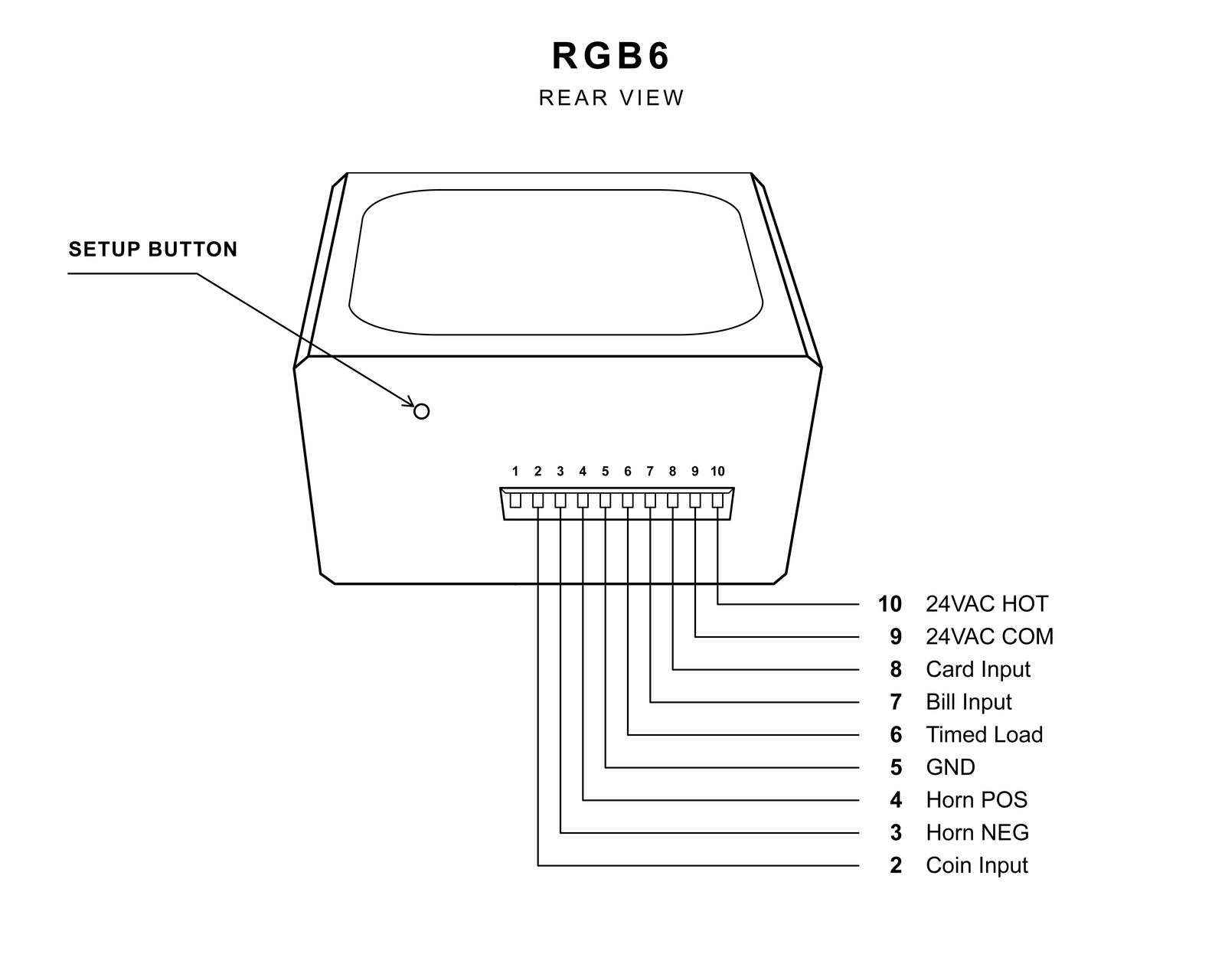
Built around the Dixmor LED 6 connector. If your bay has an LED 6 today, the RGB6 plugs straight into the same harness.
- check_circle Same 10-pin, 3.96mm Molex plug as the Dixmor LED 6
- check_circle Pinout matches the Dixmor LED 6, so no wires move. Pin 1 (the LED 6's 24V counter pulse output) isn't used; the RGB6 logs pulses and revenue online instead.
- check_circle 24V AC power
- check_circle Bottom wing-nut mounting
- check_circle Includes a Molex connector with 16" cable for new installs
RGB7 Bay Timer
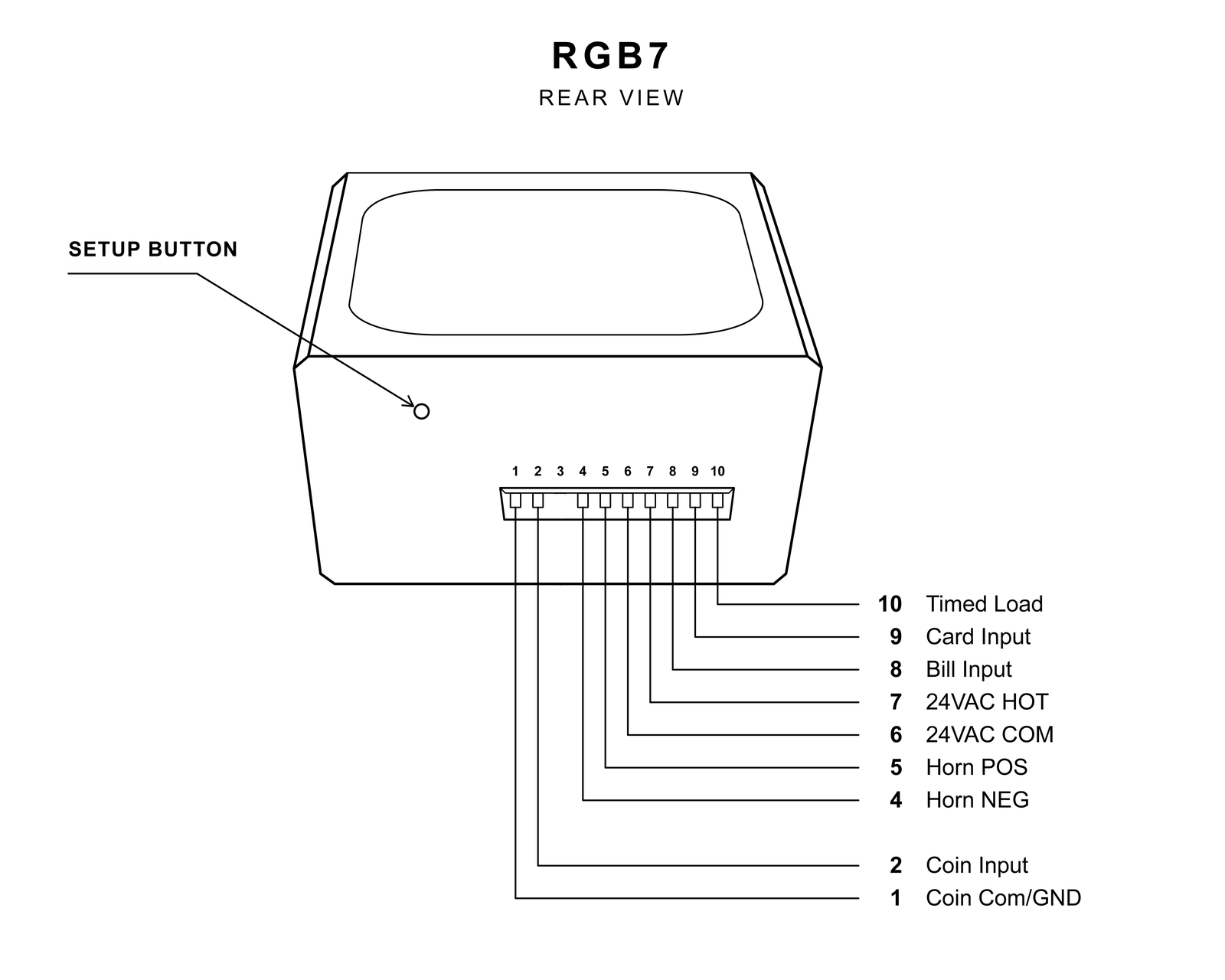
Built around the Dixmor LED 7 connector. If your bay has an LED 7 today, the RGB7 plugs straight into the same harness.
- check_circle Same 10-pin, 3.96mm Molex plug as the Dixmor LED 7
- check_circle Pinout matches the Dixmor LED 7, so no wires move
- check_circle 24V AC power
- check_circle 4-tab face mounting
- check_circle Includes a Molex connector with 16" cable for new installs
Not sure which Dixmor you have?
Check the model label on your current timer, or send us a photo of the back through the contact form. We'll confirm which POGO model plugs into your bay before you order.
Dixmor is a trademark of its respective owner. POGO Engineering is not affiliated with or endorsed by Dixmor. The name is used only to describe connector and pinout compatibility.
Upgrade a bay in minutes
Your harness already has the right plug on it, so swapping a Dixmor for a POGO timer is a mounting job, not a wiring job.
Power down the bay
Shut off the 24V AC supply to the timer, the same as for any service work.
Unplug the Dixmor
Disconnect the Molex plug from your LED 6 or LED 7 and remove the old timer. The harness stays in the bay.
Mount and plug in
Mount the RGB6 or RGB7 and plug the same harness into it. Coin, bill, card and horn connections carry over through the plug.
Power up and set it up
Connect from your phone or laptop to set prices, time per coin, messages and colors.
See the timer
A closer look at the hardware, the Lexan face and the full-color display your customers will see.


More than a replacement
The RGB6 and RGB7 fit your bay like the timer you're replacing, then add a full-color display, Wi-Fi and online tools your old timer never had.
No-wiring Dixmor upgrade
The same 10-pin Molex plug and pinout as the Dixmor LED 6 and LED 7. Your existing harness plugs straight in.
Full-color RGB display
A bright 8x25 RGB LED display that shows time, price and messages in any color you choose.
Countdown and count-up operation
Works with coin, bill and card pulse inputs, including CryptoPay-style card pulse handling.
Custom messages and colors
Choose the text, colors and animations customers see while the bay is idle, taking payment, running, warning, and finished.
Shatterproof Lexan face
UV-resistant, shatterproof Lexan protects the display and can be replaced in the field in minutes.
Power loss and tamper protection
Resumes a running wash after a power interruption, and detects the magnet tricks used to steal free wash time.
1-year hassle-free warranty
Covered for a full year. Replacement displays and Lexan lenses are available and swap in minutes.
Wireless setup
Set up the timer from your phone, tablet or laptop, on site or remotely from your PogoWash.com dashboard. Normal wash operation never needs the internet.
Remote activation
Start a bay from anywhere for customer service, testing, wash-downs, or payment troubleshooting.
Revenue logging
See coin, bill and card revenue per bay on PogoWash.com, with coin vault levels and collection reminders.
Employee accounts
Give employees remote activation access and log cash collections, so every deposit can be checked against recorded revenue.
Outage alerts
Get notified when your wash loses power or internet, so you hear about it before your customers do.
Firmware updates
New features and fixes install over Wi-Fi at a time you choose, so your timers keep improving after installation.
Upgrade questions
What operators ask most before replacing their Dixmor timers.
Ready to retire your Dixmor?
Order the RGB6 to replace a Dixmor LED 6, or the RGB7 to replace a Dixmor LED 7. Both are designed and built in the USA. Thank you for choosing us!
Now Shipping
RGB6 & RGB7 Bay Timers
Full-color, Wi-Fi-connected bay timers that plug into your existing Dixmor LED 6 or LED 7 wiring.
- check_circle RGB6: replaces the Dixmor LED 6, bottom wing-nut mount
- check_circle RGB7: replaces the Dixmor LED 7, 4-tab face mount
- check_circle Includes a Molex connector with 16" cable
Ordering several bays? See every option on the products page.
Customer Area
Manage your timers, view revenue, start bays remotely and request support from your PogoWash.com dashboard.
Information
Pinouts, setup previews, manuals and firmware for the RGB6 and RGB7.
Pinout Diagrams
Compare our pinouts with your Dixmor LED 6 or LED 7. The 10-pin, 3.96mm Molex connector and pin layout match, so your existing harness plugs straight in. On the RGB6, pin 1 (the LED 6's 24V counter pulse output) isn't used, since pulse and revenue logging happen online.
View RGB6 Pinout View RGB7 PinoutUser Setup Preview
See how easy setup is. This preview shows the same setup page you'll use to set prices, messages and colors on your timer.
Open PreviewOwner's Manual
Step-by-step installation and setup instructions for your timer.
RGB6 Manual RGB7 ManualWiring Diagrams
Replacing a Dixmor? You won't need one, because your harness is already wired. For new installs or unusual coin, bill and card combinations, send us your equipment list and we'll provide the right diagram.
Request a DiagramDevice Firmware
We are frequently updating our timers to add more features. Timers can be updated remotely, so you always have the latest improvements without having to ship your timer or hook it to a computer.
Get In Touch
Questions about replacing your Dixmor timers, a pre-sale question, feedback, or an issue to report.
Upgrading from Dixmor?
Tell us which model you have (LED 6 or LED 7), how many bays you're upgrading, and what payment equipment you run (coin, bill, card reader). A photo of the back of your current timer helps us confirm the match.
For any other question, include as much detail as you can and we'll get back to you quickly.